People are asking ChatGPT which product to buy, which clinic to book and which course to take. Some of them click through to your site. But when you open Google Analytics 4 (GA4), those visits are split across four places: the new AI Assistant channel, Referral, Unassigned and Direct.
That’s the real problem when you try to track ChatGPT traffic in GA4. The data isn’t missing. GA4 just files the same kind of visitor under different labels, depending on how they clicked.
I’ve spent more than six years in SEO, working on e-commerce, healthcare, education and construction sites. This guide is the setup I’d build on any GA4 property today. It takes about 15 minutes, and by the end you’ll have:
- A copy-paste regex that won’t accidentally catch Google organic
- A way to capture Perplexity, Claude and other sources the native AI channel misses
- A quick check for the October 2026 ChatGPT tracking bug
- A monthly AI traffic report template you can send to clients or your boss
Quick answer: To track ChatGPT traffic in GA4, open Reports > Acquisition > Traffic acquisition and check the AI Assistant channel. Then build a custom channel group that matches Source against an AI regex, placed above Referral. That captures Perplexity, in-app ChatGPT visits and sessions from before May 2026.
Steps at a glance
- Check your existing ChatGPT traffic in GA4 (5 minutes)
- Create an AI custom channel group
- Track Perplexity traffic separately
- Build an AI referral traffic report
- Find which pages AI sends visitors to
- Measure conversions and revenue from AI traffic
- Annotate key dates and validate your setup
What Counts as AI Search Traffic in GA4?
AI search traffic is any human visit that starts with a click inside an AI tool: ChatGPT, Perplexity, Gemini, Claude, Copilot and the rest. Before you build anything, separate it from two things that look similar but behave very differently.
AI referral traffic vs AI search traffic vs AI crawler hits
| Term | What it is | Where you see it |
|---|---|---|
| AI referral traffic | A person clicks a link or citation in an AI answer and lands on your site | GA4 (AI Assistant, Referral, Unassigned or Direct) |
| AI search traffic (Google) | A person clicks your link inside Google AI Overviews or AI Mode | GA4 as Organic Search; Search Console for impressions |
| AI crawler hits | A bot such as GPTBot or PerplexityBot fetches your page | Server or CDN logs only. GA4 never sees them |
This guide focuses on the first two, because those are real people who can become customers.
Why it’s worth tracking, even at small volume
AI is still a small slice of traffic for most sites. SE Ranking’s study of 101,574 websites put AI referrals at 0.32% of total traffic in 2026, up from 0.02% in 2024. That’s a 16x jump in two years. ChatGPT sent 74.78% of those AI visits, followed by Gemini (11.56%) and Perplexity (7.23%).
The volume is small, but these visitors tend to be further along. They’ve already asked a detailed question and read a summary before they click. In Adobe’s July 2026 retail data, AI-referred visits converted 60% better than non-AI traffic and brought in 53% more revenue per visit. That was the 11th month in a row AI beat non-AI on conversion.
It doesn’t hold everywhere, though. A 973-site e-commerce study covering August 2024 to July 2025 found ChatGPT converting 13% below organic search. Results depend on your industry, your offer and the year you measure. That’s why you need your own numbers instead of borrowing someone else’s.
So if AI sends 0.3% of your sessions but a much bigger share of your leads or sales, it deserves its own row in your reports. You’ll only know by measuring it properly, and that’s what the rest of this guide sets up.
How GA4 Records ChatGPT, Perplexity and Other AI Visits in 2026
GA4 decides a session’s channel from two things: the source (who sent the visit) and the medium (what kind of visit it was). AI tools don’t pass those values consistently, and that’s where the mess starts.
The native AI Assistant channel (May 2026)
On May 13, 2026, Google added an AI Assistant channel to GA4’s Default Channel Group. Google pitched it as a way to “monitor how generative AI impacts your business,” as Search Engine Journal reported.
A few things to know about it:
- How it tags visits: when GA4 recognizes the referrer as an AI assistant, it sets the medium to
ai-assistantand the campaign to(ai-assistant). - It’s forward-only. GA4 doesn’t reclassify anything before the launch. Most properties only got it around early June 2026, per Digital Applied.
- You can’t edit it. Default channel groups are locked. You can only build your own group alongside it.
- The platform list keeps changing. At launch Google named ChatGPT, Gemini and Claude. By June, the help page listed ChatGPT, Gemini, DeepSeek, Copilot and Grok, and Claude was gone.
- Perplexity isn’t on it. Perplexity clicks still land in Referral.
- Google’s own AI is excluded. AI Overviews and AI Mode clicks stay in Organic Search.
Itamar Blauer summed up the catch in his Search Engine Journal analysis: “The native channel only counts forward from the rollout date.”
Where each AI platform lands by default
| Platform | Default GA4 channel | Passes referrer? | How to capture it |
|---|---|---|---|
| ChatGPT (web) | AI Assistant or Referral (chatgpt.com) | Often no; relies on utm_source=chatgpt.com | Custom channel group on Source |
| ChatGPT app and in-app browser | Unassigned (chatgpt.com / (not set)) or Direct | No | Source match catches the tagged ones; the rest is dark traffic |
| ChatGPT Atlas browser | Direct or (not set) | Often no | Mostly dark traffic; estimate with proxies |
| Perplexity and Comet browser | Referral (perplexity.ai / referral) | Yes | Add perplexity.ai to your regex |
| Gemini | AI Assistant (gemini.google.com) | Usually | Match gemini.google.com, never bare “google” |
| Claude | Referral (claude.ai), no longer on Google’s list | Usually | Add claude.ai to your regex |
| Copilot | AI Assistant (copilot.microsoft.com) | Usually | Match the Copilot hosts |
| DeepSeek and Grok | AI Assistant | Usually | Match deepseek.com and grok.com |
| Google AI Overviews and AI Mode | Organic Search (google / organic) | Yes, but as Google | Search Console, not GA4 |
Atlas and Comet behavior is based on MarTech’s testing. Always confirm against your own Source/medium report, because these change without notice.
Why one source shows up in three channels
Add “Session source / medium” to your Traffic acquisition report and you’ll likely see chatgpt.com three times:
chatgpt.com / ai-assistant→ AI Assistant (recognized and tagged)chatgpt.com / referral→ Referral (older or untagged sessions)chatgpt.com / (not set)→ Unassigned (source survived, medium didn’t)
The (not set) version mostly comes from ChatGPT’s in-app browser. It strips the referrer, so the UTM keeps the source but no medium arrives. No default rule matches, so GA4 drops it into Unassigned.
As Blauer put it: “The same source, chatgpt.com, was sitting in three different channels at once.” The fix is to match on Source only, which is what Step 2 does.
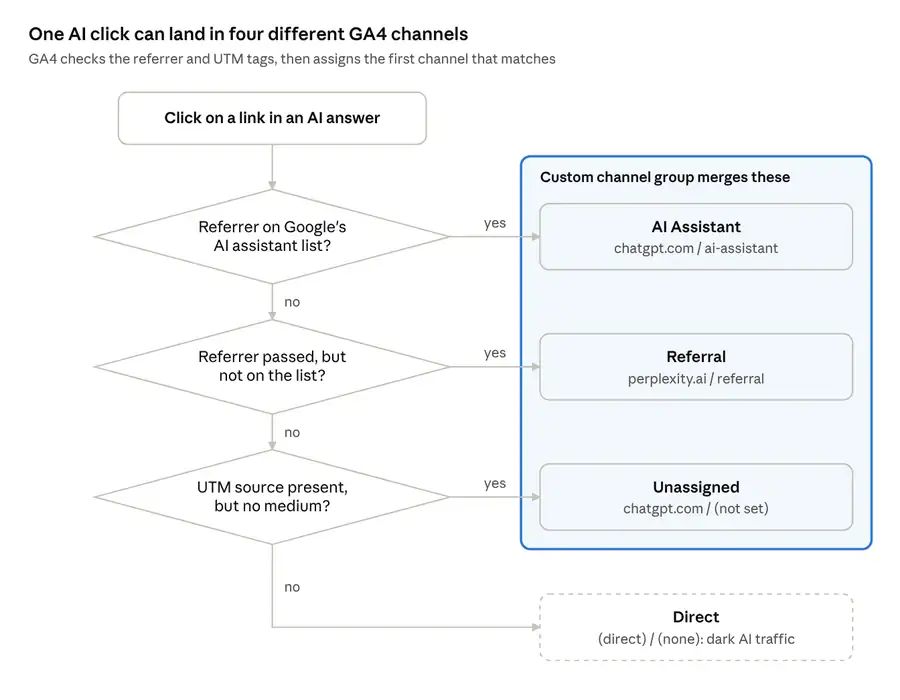
A custom channel group that matches on Source pulls the first three outcomes back into one AI row. Visits with no referrer and no UTM stay in Direct, which is why every AI number in GA4 is a minimum.
Before You Start: What You Need
You don’t need developer help or Google Tag Manager for this. You need:
- Editor (or Administrator) access to the GA4 property. Viewers can’t create channel groups.
- Key events already set up (purchases, form submits, calls). Without them, you can count AI visits but not their value.
- Today’s date written down, so you can annotate when your tracking changed.
Starting late isn’t a problem. Custom channel groups apply to past data in your reports, so you lose nothing by building one today.
Step 1: Check Your Existing ChatGPT Traffic in GA4 (5 Minutes)
Start by seeing what GA4 already captures. This gives you a baseline and shows how badly your AI traffic is split.
Before you start, set the date range to at least the last 90 days. AI traffic is low-volume, so a single week can be pure noise.
- Go to Reports > Acquisition > Traffic acquisition.
- Make sure the table’s primary dimension is Session default channel group.
- Look for the AI Assistant row. If it’s missing, either no recognized AI visits have arrived yet or the channel hasn’t reached your property.
- Now change the primary dimension to Session source / medium.
- Type each of these into the search box above the table, one at a time:
chatgpt,perplexity,gemini,claude,copilot.
Note the session count for each row you find. On many sites, chatgpt.com shows up with two or three different mediums, and the (not set) row surprises people the most.
Here’s the kind of pattern to look for (the figures are illustrative, not real data):
| Session source / medium | Channel GA4 assigns | Sessions (example) |
|---|---|---|
| chatgpt.com / ai-assistant | AI Assistant | 142 |
| chatgpt.com / referral | Referral | 37 |
| chatgpt.com / (not set) | Unassigned | 21 |
| perplexity.ai / referral | Referral | 18 |
In this example, the AI Assistant channel shows 142 ChatGPT sessions, but ChatGPT actually sent 200. Perplexity’s 18 sessions sit in Referral with every other website. That gap is what Step 2 fixes.
Step 2: Create an AI Custom Channel Group (The Permanent Fix)
If you only do one thing from this guide, make it this step. A custom channel group pulls every AI source into one clean row, including sessions from before May 2026.
Open the channel group editor
Go to Admin > Data display > Channel groups, then click Create new channel group. Name it something obvious, like “AI Tracking”. GA4 pre-fills it with copies of the default channels, which is what you want.
Add an “AI Assistants” channel that matches on Source
Click Add new channel and name it “AI Assistants”. Set the condition to:
Source → matches regex → (paste the pattern below)
Why Source and not Source/medium? Because the medium is the unreliable part. ChatGPT traffic arrives as ai-assistant, referral or (not set). The source, chatgpt.com, is the one value that stays consistent. Matching on Source alone merges all three.
The copy-paste regex
^(.*\.)?(chatgpt\.com|chat\.openai\.com|openai\.com|perplexity\.ai|gemini\.google\.com|bard\.google\.com|claude\.ai|copilot\.microsoft\.com|copilot\.cloud\.microsoft|deepseek\.com|grok\.com|meta\.ai|chat\.mistral\.ai|you\.com|poe\.com|phind\.com)$|^(chatgpt|openai|perplexity|claude|copilot)$Each part of the pattern has a job:
| Part | What it does |
|---|---|
^ and $ | Anchor the match to the whole source value, so you.com can’t match a domain like bayou.com |
(.*\.)? | Allows any subdomain, such as www.perplexity.ai or chat.deepseek.com |
\. | A literal dot. An unescaped . means “any character” |
| The domain list | Only full, specific AI hostnames. gemini.google.com instead of google |
^(chatgpt|openai|...)$ | Catches bare UTM values like utm_source=chatgpt that some tools and apps send |
Because it’s fully anchored, the pattern behaves the same whether GA4 treats your condition as a full or partial match.
What not to do: never use bare tokens like gpt, ai, .ai or google. gpt matches unrelated tools, .ai matches any startup’s domain, and google swallows your entire organic search channel. It’s the fastest way to make AI traffic look far bigger than it really is.
Test it before you save. Open Explore > Free form, add Session source as a dimension, and add a filter: Session source matches regex plus your pattern. If anything other than AI tools appears, tighten the list.
Move the channel to the top, then save
GA4 evaluates channels from top to bottom and stops at the first match. If Referral sits above your AI channel, Perplexity gets labeled Referral and never reaches your rule.
Click Reorder, drag AI Assistants to the very top, above Organic Search, Referral and the native AI Assistant channel. Click Apply, then Save group.
Optional: separate channels for each AI platform
One AI row is enough for most clients. If you want to compare platforms, add four channels instead, in this order:
| Channel | Source matches regex |
|---|---|
| ChatGPT | ^(.*\.)?(chatgpt\.com|chat\.openai\.com|openai\.com)$|^(chatgpt|openai)$ |
| Perplexity | ^(.*\.)?perplexity\.ai$|^perplexity$ |
| Gemini | ^gemini\.google\.com$|^bard\.google\.com$ |
| Other AI | The full regex above, as a catch-all for everything else |
Keep the specific channels above “Other AI”, or the catch-all will grab everything first.
One limit to plan around: a standard GA4 property allows only two custom channel groups (360 properties get five), with up to 25 channels each, according to Tatvic’s GA4 channel grouping guide. Don’t burn a slot on a test group you forget to delete.
Step 3: How to Track Perplexity Traffic in GA4
Perplexity is the AI source people most often think they’re tracking but aren’t. It is not part of GA4’s native AI Assistant channel. By default, it shows up as perplexity.ai / referral and gets lumped in with every other referring website.
The upside: Perplexity is one of the better-behaved AI tools. It usually passes a referrer, and clicks from Perplexity’s Comet browser report as the same perplexity.ai source, based on MarTech’s testing. Once perplexity.ai is in your regex (it already is in Step 2), it moves out of Referral and into your AI channel.
To check Perplexity traffic in GA4 on its own:
- Open Traffic acquisition and switch the dimension to Session source / medium.
- Search for
perplexity. - Add a comparison against
chatgpt.comandgoogle / organic.
Then compare these metrics side by side:
- Engaged sessions and engagement rate: are Perplexity visitors actually reading?
- Key events: do they submit forms, call or buy?
- Revenue (e-commerce): what’s each session worth?
Don’t be surprised if Perplexity is small. SE Ranking found its share of AI referrals slipping in 2026. In the US it fell from 11.42% to 6.85%. But Perplexity answers are built around numbered citations, so a click usually means the person wanted your page specifically. Judge it on key events, not volume.
Step 4: Build an AI Referral Traffic Report in Google Analytics
You’ve fixed the classification. Now make the data one click away, so you (or your client) never have to rebuild filters again. This AI referral traffic report is worth adding to every Google Analytics property you manage.
- Go to Reports > Library (bottom of the left menu). You need Editor access to see it.
- Click Create new report > Create detail report, then start from the Traffic acquisition template.
- Set the primary dimension to Session [your channel group name], for example “Session AI Tracking”. Add Session source as a second dimension.
- Set the metrics to: Sessions, Engaged sessions, Engagement rate, Average engagement time per session, Key events, Session key event rate and Total revenue.
- Add a filter where your channel group exactly matches “AI Assistants” if you want an AI-only view.
- Save it with a clear name, such as “AI Referral Traffic”.
Publish it to the left-hand menu
Back in the Library, click Edit collection on the Life cycle collection (or create a new collection). Drag your new report under Acquisition, save, then click Publish on the collection card. The report now sits in the left navigation for everyone with access.
Tip for agencies: name the report identically in every client property. It makes monthly reporting and handovers much faster.
Step 5: Find Which Pages AI Sends Visitors To
Sessions tell you how much. Landing pages tell you why. This is where AI tracking turns into content strategy.
- Go to Explore > Free form.
- Import these dimensions: Landing page + query string, Session [your channel group] and Session source.
- Import these metrics: Sessions, Engaged sessions, Engagement rate and Key events.
- Drag Landing page + query string into Rows and Session source into Columns.
- Add a filter: your channel group exactly matches “AI Assistants”.
Sort by Sessions. You now have a ranked list of the pages AI tools cite and people actually click.
Reverse-engineer the prompt
GA4 can’t show you what someone typed into ChatGPT. But the landing page is a strong clue. Map your top pages to the question they most likely answered:
| Landing page type | Likely question asked in the AI tool | What to do next |
|---|---|---|
| Comparison page (“X vs Y”) | “Which is better, X or Y, for my situation?” | Add a clear verdict table near the top |
| Pricing or cost guide | “How much does X cost in [city/country]?” | Keep prices current and dated |
| How-to or setup guide | “How do I do X step by step?” | Tighten steps; add screenshots |
| Location or service page | “Best [service] near [suburb]” | Strengthen reviews, NAP details and FAQs |
| Health or education explainer | “What are the signs of X?” or “Which course for Y?” | Add author credentials and cite sources |
If a URL has ?utm_source=chatgpt.com in the query string, you know the click came from a link inside ChatGPT, not a typed URL.
Step 6: Measure Conversions and Revenue from AI Traffic
This is the part clients actually care about. Sessions don’t pay invoices. Leads and sales do.
In your AI Referral Traffic report (Step 4), switch the dimension back to your full channel group so every channel is listed. Now compare AI Assistants against Organic Search on three numbers:
- Session key event rate: the share of sessions that converted
- Key events per session: useful if you track several actions
- Total revenue and revenue per session: for e-commerce
Keep the comparison honest. Similarweb clickstream data cited by Search Engine Journal has ChatGPT referrals converting at around 7%. Adobe reports AI beating non-AI retail traffic by 60%. Your site could land above or below both, and that’s fine. Your own number is the one to act on.
Use this table to read your result:
| If AI’s key event rate is… | What it usually means | What to do |
|---|---|---|
| Higher than organic | AI is sending people who are ready to act | Protect and expand the pages AI already cites |
| About the same as organic | AI behaves like another quality search channel | Keep tracking; grow volume with GEO work |
| Lower than organic | Visitors came for an answer, not to buy or enquire | Add clearer next steps and offers on those pages |
Give it at least 90 days. With low AI volume, a handful of conversions can swing the rate wildly from month to month.
Look at conversion paths, not just last click
Many AI visitors don’t convert on the first visit. They read your page from a ChatGPT citation, leave, and come back days later by typing your URL or searching your brand.
Go to Advertising > Attribution paths (called Conversion paths in older guides) and switch the touchpoint dimension to Source. Look for paths that start with chatgpt.com or perplexity.ai and end with (direct) or google. These are AI-assisted conversions, and last-click reports give them zero credit.
Step 7: Annotate Key Dates and Validate Your Setup
AI traffic data has several “breaks” in it. Without annotations, someone will look at your report in six months and draw the wrong conclusion.
Add these annotations
GA4 supports annotations on report charts. Add one for each of these dates:
| Date | What happened | Why it matters |
|---|---|---|
| May 13, 2026 | Native AI Assistant channel launched | AI Assistant row starts here; earlier data sits in Referral |
| Early June 2026 | Rollout reached most properties | Your property may have started later |
| Sep 28 to Oct 2, 2026 | Gemini referrals dipped (tagging change) | Explains a short Gemini drop |
| Oct 9 to Oct 16, 2026 | ChatGPT UTM and referrer bug | ChatGPT fell, Direct rose |
| Your setup date | You published your AI custom channel group | Marks when clean AI reporting began |
The Gemini dip is from LLM Pulse’s monitoring. More on the ChatGPT bug below.
Test it yourself in 3 minutes
Don’t trust a setup you haven’t tested. Here’s how to check yours:
- Ask ChatGPT (with search on) and Perplexity a question your page answers well, and get it cited.
- Click the citation on desktop. Then repeat in the ChatGPT mobile app.
- Open Reports > Realtime overview within a few minutes and check the traffic source card for
chatgpt.comandperplexity.ai. - A day later, confirm both sessions appear under AI Assistants in your custom channel group.
One gotcha: if your property filters internal traffic by IP, your own test visit gets excluded. Test from a mobile network or temporarily switch the filter to Testing.
What GA4 Can’t See: Dark AI Traffic
Even a perfect setup undercounts AI. A custom channel group fixes classification. It can’t fix collection. If a visit arrives with no referrer and no UTM, GA4 has nothing to classify.
Mobile apps, in-app browsers and copy-paste land in Direct
Three common journeys leave no trail:
- In-app browsers in the ChatGPT app often strip the referrer.
- AI browsers like ChatGPT Atlas often show up as Direct or (not set).
- Copy-paste: someone copies your URL or brand name from an answer and types it in later.
Digital Applied cites industry estimates that 60 to 70% of AI sessions may land in Direct. Treat that as a rough range, not a fact about your site. The point is that your AI number is a floor, not a ceiling.
Why ChatGPT traffic dropped in October 2026
If your ChatGPT traffic suddenly halved in October, you’re not alone, and you probably didn’t lose those visitors.
Here’s what happened:
- October 9, 2026: many ChatGPT links started opening with no
utm_source=chatgpt.comand no referrer. GA4 filed those clicks as Direct. - The scale: across sites monitored by LLM Pulse, daily ChatGPT sessions fell about 46%, while total site traffic dipped only about 2%.
- The clearest evidence: Adobe’s Cedric Huesler analyzed around 500 pages. ChatGPT lost about 31,000 visits a day while Direct gained about 26,000 a day on the same pages. He described the clicks as arriving with “no tag and no referrer,” as Relevant Audience reported.
- October 15 and 16: OpenAI treated it as a bug and rolled out a fix. Since October 16, almost all ChatGPT links carry
utm_source=chatgpt.comagain, according to sitebrunch. The referrer is still missing on most clicks.
Visits from that week will stay in Direct for good, because GA4 doesn’t rewrite history. It’s also why Step 2 matches on Source: with UTMs back but referrers gone, the source is the only reliable signal ChatGPT sends.
Check it on your own site: in Explore > Free form, compare daily ChatGPT sessions with Direct sessions for October 1 to 31, 2026. Filter to the landing pages that got ChatGPT traffic in September. If Direct rose on those pages as ChatGPT fell between October 9 and 16, the bug explains your drop, not lost visibility.
Ways to estimate the hidden share
You can’t measure dark AI traffic directly. You can estimate it with three proxies:
- Direct sessions to deep pages. Nobody types
/blog/how-to-choose-a-childcare-centre/from memory. A rise in Direct entries to long, specific URLs often signals AI or app clicks. - A “How did you hear about us?” field. Add “ChatGPT”, “Perplexity”, “Google AI Overview” and “Other AI tool” as options on your contact or checkout form. Self-reported data catches what analytics misses.
- Branded search lift. In Search Console, watch impressions for your brand name. People who discover you in an AI answer often Google you before they visit.
Google AI Overviews and AI Mode: measure in Search Console, not GA4
No regex can separate AI Overviews or AI Mode clicks in GA4. They arrive as google / organic, the same as a blue link. Don’t try to match on “google” in your AI channel. You’ll just move your whole organic channel.
Use Search Console instead. Google confirmed in June 2025 that “AI Mode is now counting towards totals in Search Console,” as Search Engine Roundtable reported. The catch is that it’s blended into web search totals and can’t be filtered out. Track impressions and clicks on the informational queries where you know AI Overviews appear, and watch for click-through rate changes.
AI crawlers aren’t visitors
GPTBot, OAI-SearchBot, ChatGPT-User, PerplexityBot and Perplexity-User are bots. They don’t run JavaScript, so the GA4 tag never fires and they’ll never appear in your reports.
If you want to know which AI bots crawl your site, and which pages they fetch, check your server logs or CDN logs (Cloudflare has a built-in AI crawler view). Crawling shows that AI tools can read your content. GA4 shows whether people click. You need both pictures.
How to Report AI Traffic to Clients and Stakeholders
AI traffic comes up in almost every client meeting right now. The risk is over-promising with a number that’s really a minimum. Use a simple, consistent monthly format:
| Metric | This month | Last month | Change | Note |
|---|---|---|---|---|
| AI sessions (custom channel group) | Floor, not total AI influence | |||
| AI share of total sessions | Compare with organic share | |||
| AI engagement rate | vs organic engagement rate | |||
| AI key events | Leads, calls, purchases | |||
| AI revenue (e-commerce) | Revenue per session too | |||
| Top 5 AI landing pages | Pages to refresh first | |||
| Branded search impressions (GSC) | Proxy for dark AI influence |
Add this line under the table every month:
“AI figures are a minimum. Some AI-driven visits arrive without tracking data and are counted as Direct.”
That one line saves you a difficult conversation later. When AI traffic “drops” because a platform changes how it passes links (as ChatGPT did in October), your client already knows the number can move for reasons that have nothing to do with your work.
If you’re an agency reporting under your own brand, the same template works as an unbranded report. It’s part of what we deliver through our white-label partnership.
Troubleshooting: Common GA4 AI Tracking Problems
| Symptom | Likely cause | Fix |
|---|---|---|
| AI Assistant channel shows zero | Rollout hasn’t reached your property, or no recognized AI visits yet | Check Source/medium for chatgpt.com; rely on your custom group |
chatgpt.com sits in Unassigned | UTM arrives without a medium, usually from the in-app browser | Match on Source only in your custom channel group |
| Regex catches Google organic | Pattern contains bare google or .ai | Use full hostnames like gemini.google.com and anchor with ^ and $ |
| ChatGPT dropped in October 2026 | The October 9 to 16 UTM and referrer bug | Annotate it; compare ChatGPT and Direct on the same pages |
| Perplexity still in Referral | Not on Google’s native list, or your AI channel sits below Referral | Add perplexity.ai and move your channel to the top |
| Custom group missing from reports | The report still uses the default channel group | Change the dimension to Session [your group name] |
| Test visit doesn’t show in Realtime | Internal traffic filter excludes your IP | Test from mobile data or set the filter to Testing |
Turn AI Traffic Data Into Action
Tracking is only useful if it changes what you do next. Once your report is running, use it to guide your GEO and AEO work:
- Refresh your top AI landing pages first. They’re already being cited. Update stats, dates and screenshots so they keep their spot.
- Answer the question in the first two or three sentences. AI tools pull clear, direct answers. Bury the answer and you lose the citation.
- Strengthen trust signals. Author bios, cited sources and original data make pages easier for AI tools to recommend. It’s the same E-E-A-T work that drives strong SEO in Google.
- Fix the pages that get AI clicks but no conversions. That’s a conversion rate optimization problem, not a traffic problem.
If you’d rather have specialists handle it, our AEO and GEO services focus on getting brands cited in ChatGPT, Perplexity, Gemini and Google AI Overviews, and we track the results with the same setup you’ve just built.
FAQs
Does GA4 track ChatGPT traffic automatically?
Partly. Since May 2026, GA4’s AI Assistant channel automatically tags ChatGPT visits it recognizes with the medium ai-assistant. But visits from the ChatGPT app, AI browsers and copied links often arrive without a referrer and land in Direct or Unassigned. A custom channel group catches more of them.
Why does ChatGPT traffic show as (not set) or Unassigned?
Because utm_source=chatgpt.com arrives without a medium. This usually happens in ChatGPT’s in-app browser, which strips the referrer. GA4 keeps the source but has no medium to match against its channel rules, so the session falls into Unassigned. Matching your custom channel on Source only fixes it.
Is Perplexity included in GA4’s AI Assistant channel?
Not at the time of writing. Google’s list currently names ChatGPT, Gemini, DeepSeek, Copilot and Grok. Perplexity traffic shows up as perplexity.ai / referral in the Referral channel. Add perplexity.ai to a custom channel group placed above Referral to track it as AI traffic.
Why did my ChatGPT traffic drop in October 2026?
Most likely because of a ChatGPT tracking bug. From October 9, many ChatGPT links opened without a UTM or referrer, so GA4 counted those visits as Direct. OpenAI rolled out a fix from October 15. Compare ChatGPT and Direct sessions on the same pages to confirm it on your site.
Can I see Google AI Overviews or AI Mode traffic in GA4?
No. Clicks from AI Overviews and AI Mode are recorded as google / organic, the same as regular search results. GA4 can’t separate them. Use Google Search Console instead, where AI Mode data is included in your web search totals, though it can’t be filtered out on its own.
Will a custom channel group change my historical data?
No, it doesn’t alter your raw data. A custom channel group is applied to past data when you view reports, so you can see AI traffic from before you built it. That’s different from the native AI Assistant channel, which only counts sessions from its rollout date forward.
What regex should I use to track AI traffic in GA4?
Use an anchored pattern that lists full AI hostnames, like chatgpt.com, perplexity.ai, gemini.google.com and claude.ai, anchored with ^ and $. Copy the tested pattern from Step 2. Avoid bare tokens like gpt or google, and review the list every quarter as new AI tools appear.
How do I track Gemini and Claude traffic in GA4?
Gemini visits come from gemini.google.com and are on Google’s native AI Assistant list. Claude visits come from claude.ai and currently land in Referral, because Claude was dropped from Google’s list in mid-2026. The Step 2 regex covers both, so they’ll appear together in your AI Assistants channel.
Does AI referral traffic convert better than organic?
It depends on your site. Adobe’s July 2026 retail data showed AI visits converting 60% better than non-AI traffic. An earlier 973-site e-commerce study found ChatGPT converting 13% below organic. Measure your own key event rate for AI versus organic over at least 90 days before drawing conclusions.
Key Takeaways
Tracking AI traffic in GA4 isn’t hard once you know where it hides. In short:
- Check the native AI Assistant channel, but don’t rely on it alone. It’s forward-only and misses Perplexity and Claude.
- Build a custom channel group that matches Source against a tested regex, placed above Referral.
- Report AI numbers as a floor, annotate the October 2026 bug, and use Search Console for Google’s own AI features.
Bookmark this page. The Step 2 regex, the report settings and the monthly template are all here, and we update this guide every quarter as AI platforms change how they send traffic.
Or let us do it for you. Book a free GA4 AI-tracking audit and we’ll check your setup, fix your channel groups and show you how much traffic AI is really sending your business.